Silhouette Art Services
Silhouette Art: From Any Photo to Production Ready File in 2-4 Hours
You have seen it everywhere. A dark solid shape of a horse against a white background. A clean black figure of a runner on a team jacket. A simple profile outline on a cafe wall. That visual style has a name: silhouette art. And while it looks minimal, getting it right for embroidery, printing or cutting takes more precision than most people expect. This guide covers what silhouette art actually is, where it gets used and how to get a professional silhouette file built from any photo or logo.
Quick Answer
| Question | Short Answer |
|---|---|
| What is silhouette art? | A design style using a solid single color shape that shows the outline of a subject with no internal detail. |
| Where is it used? | Embroidery, screen printing, vinyl cutting, laser engraving, signage and branding. |
| Why use it instead of full color art? | Cleaner stitching, lower stitch counts, faster production and stronger visual impact at small sizes. |
| Can any image become silhouette art? | Yes. A person, pet, logo, mascot or object can all be converted into a clean silhouette file. |
| What file formats does it produce? | AI, EPS, SVG, DST, PES and other formats depending on the final use. |
| How fast is delivery? | Standard designs deliver in 2 to 4 hours at USA Digitizing Pro. |
What Is Silhouette Art
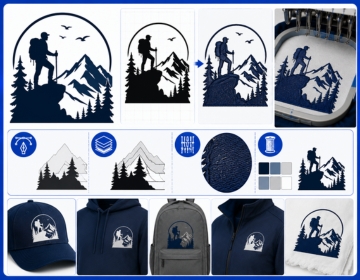
Silhouette art is a design format that strips every subject down to its purest form: one solid shape, one color, clean edges and nothing inside. No shading. No detail work. No gradients. The entire image lives in the outline and the mass of the shape.
The style has been around for centuries. Paper cut portraits were popular in 18th century Europe long before printing existed. Today the same concept runs through digital design, apparel decoration and commercial printing because it solves a specific problem that detailed art cannot. A solid shape reads clearly at any size on any background and through any production process.
How Silhouette Art Differs from Outline Art
People often confuse silhouettes with line art or outline drawings. They are not the same thing. An outline drawing shows the edge of a subject as a thin line with empty space inside. A silhouette fills the entire shape with solid color. The inside is completely flat. That difference matters a lot in production. A silhouette file cuts and stitches in one clean pass. A detailed outline with open interior spaces requires far more path work to handle correctly.
Why the Shape Has to Be Instantly Readable
A good silhouette works because the brain recognizes shapes faster than it processes detail. You see a person running a dog sitting or a mountain range in half a second just from the outer form. That instant recognition is exactly what makes the style so powerful for logos, sports apparel and signage. The design communicates before the viewer has time to read text.
Where Silhouette Art Gets Used
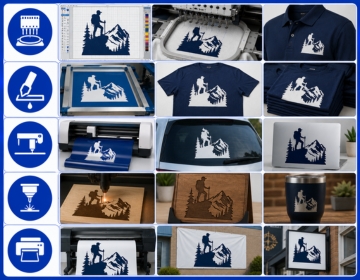
The format shows up across more production processes than most people realize. Each process has a different reason to prefer it.
Embroidery
Embroidery machines stitch along defined paths. A silhouette gives the digitizer one clean filled shape to work with. That means fewer stitch layers, lower thread density and a faster run time on the machine. A complex full color logo might need 8000 to 15000 stitches. The same subject as a silhouette can often run under 3000. Fewer stitches means lower production cost per garment. For high volume orders like team uniforms or corporate polos, that difference adds up fast.
Screen Printing
Screen printing burns each color onto a separate screen before ink goes down. A single color silhouette uses one screen. That's the minimum possible setup cost for a screen print job. Sports teams, school organizations and event organizers all use silhouette designs specifically to keep per unit printing costs low without losing visual punch.
Vinyl Cutting and Decals
Vinyl cutters trace the outer path of a shape and cut the material along that line. A silhouette gives the cutter one unbroken path to follow. The result is a clean peel and stick decal with no loose interior pieces to worry about. This matters for window graphics, car decals, helmet stickers and wall art where clean edges and easy application make the difference between a professional result and a frustrating mess.
Laser Engraving and CNC Cutting
Laser machines burn or cut along vector paths. Give them a silhouette file and they carve or engrave the exact shape you need into wood, acrylic, metal or leather. The solid fill tells the machine exactly which area to treat. Trophies, plaques, branded merchandise and custom awards all use silhouette art for this reason.
Signage and Large Format Printing
A silhouette printed at three feet wide looks just as crisp as the same design printed at three inches. The solid shape has no fine details to break down under magnification. That makes it the default choice for roadside signs, building graphics and retail displays where viewing distance varies and detail work would be invisible anyway.
Silhouette Art vs Full Color Artwork: Which One Do You Need
The answer depends on the production method and the size of the design. Full color art gives you more brand detail and a richer look. Silhouette art gives you more flexibility across production methods and better performance at small sizes.
| Factor | Silhouette Art | Full Color Artwork |
|---|---|---|
| Stitch count (embroidery) | Low. Often under 3000. | High. Can exceed 15000. |
| Screen count (screen printing) | One screen per design. | One screen per color layer. |
| Production cost | Lower per unit. | Higher per unit. |
| Readability at small size | Stays clear at any size. | Detail can get lost under half an inch. |
| Works for vinyl cutting | Yes. One clean path. | Requires color separation first. |
| Works for laser engraving | Yes. Direct file use. | Needs conversion to single tone first. |
| Best for | Uniforms, caps, decals, signage, awards. | Detailed logos, full back prints, banner art. |
How to Build a Good Silhouette from Any Subject
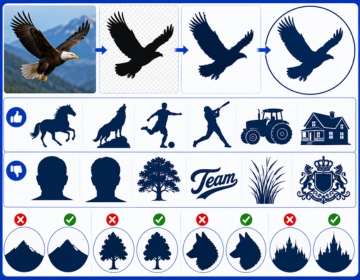
Not every image converts cleanly into a silhouette. Some subjects work perfectly. Others need adjustment before the result reads well. Here is what determines whether a subject will produce a strong silhouette.
Subjects That Work Best
Animals with distinctive body shapes are among the strongest silhouette subjects. A horse, an eagle, a bull or a wolf all produce instantly recognizable shapes. Human figures in active poses also work well. A player throwing, jumping or swinging reads clearly as a silhouette because the pose itself carries the story. Vehicles, buildings with strong roof lines and tools with distinct shapes also convert well.
What Makes a Silhouette Weak
Front facing portraits are the hardest subjects to convert. A face looking straight at the camera produces a roughly oval shape with no distinguishing features. Profile views work far better because the nose, chin, forehead and hair create a unique outline. Similarly, designs with very thin elements like fine text or small detail lines often lose legibility when filled as a solid shape. Those details need to be simplified or removed before the silhouette reads cleanly.
The Importance of Clean Outer Edges
The entire message of a silhouette lives in its outer boundary. An uneven or sloppy edge looks amateurish at every size. Professional silhouette conversion involves smoothing the outer path by hand so curves are clean and transitions between shapes are intentional. This is work that auto trace software cannot do reliably. The outer edge is not just cosmetic. For vinyl cutting and laser work, a rough edge translates directly into a rough cut.
How Silhouette Art Is Built at a Production Level
Understanding the production process helps you send better source material and get better results back. Here is how a professional studio builds a silhouette file from an image or photo.
- The studio receives the source file. A photo, logo, sketch or rough image all work. Higher resolution produces more accurate edge tracing.
- A designer opens the file and assesses the outer silhouette of the subject. Front facing subjects get flagged for profile discussion if needed.
- The outer path is drawn by hand in vector software. The designer traces the shape carefully, smoothing every curve and making deliberate choices about which details to keep in the outline and which to simplify.
- Interior elements are removed. Any lines, colors or detail work inside the shape gets deleted. The interior becomes a flat fill.
- The silhouette is reviewed at multiple sizes: thumbnail, standard print and large format. A shape that reads clearly at all three sizes is approved.
- The file is exported in the requested formats. For embroidery, this means a stitch file (DST, PES or EMB). For print or cutting, this means AI, EPS or SVG. For laser work, a DXF or SVG is standard.
- Delivery happens within 2 to 4 hours for standard designs submitted before 3 PM CT.
Real Scenario: Why a Sports Team Switched to Silhouette Designs
A youth soccer club in Austin placed an order for 180 jerseys with their mascot, a detailed full color wolf head, embroidered on the left chest. The stitch count on the original file came in at over 12000. At that count the embroidery added noticeable weight to the jersey fabric and the fine fur detail inside the wolf head looked muddy at 2.5 inches wide.
The club switched to a silhouette version of the same wolf head. The outer shape stayed instantly recognizable. Stitch count dropped to under 3000. The design sat flatter on the fabric, ran faster on the machine and cost less per jersey. The club kept the full color version for their website and printed banners. The silhouette version went on every wearable item. That split approach is how professional apparel decorators handle complex logos today.
Silhouette Art for Brand Identity
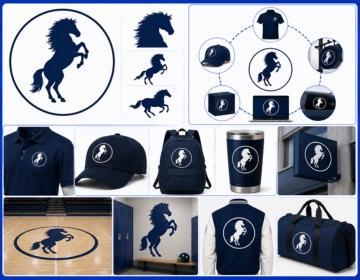
Silhouettes carry weight in brand recognition because the shape alone becomes the identifier. Many of the most recognizable brand marks in the world work as silhouettes: a bitten apple, a swoosh, a pair of arches. The shape communicates the brand without color, text or detail. Building a silhouette version of your logo is not just a production shortcut. It tests whether your brand mark has the visual strength to stand on its own.
Using Silhouettes Across Brand Touchpoints
A brand that has a strong silhouette asset can use it consistently across embroidery, signage, decals, packaging and web. The same file serves all those channels without modification. That consistency builds recognition faster than using different design treatments per medium. USA Digitizing Pro builds silhouette files that work across all production formats so one order covers multiple applications.
Silhouettes for Mascots and Sports Branding
Sports teams are among the heaviest users of silhouette art in the US. The format works for everything from cap embroidery to court graphics to locker room wall decals. A mascot silhouette at full back jacket scale looks dramatic. The same silhouette at half inch cap size stays readable. No other art style handles that range as cleanly. Teams that invest in a professionally built silhouette file use it for years across every branded item they produce.
What to Send When You Order a Silhouette File
The source file determines how much cleanup is needed and how fast the job runs. Better input means faster delivery and a more accurate result.
- Send the clearest image you have. A high resolution JPEG or PNG works fine. A photo against a clean background traces more accurately than one with a cluttered background.
- Specify whether you want a full body silhouette or a profile view. For portraits and mascots, profile views produce stronger shapes.
- Tell the studio what the silhouette will be used for. Embroidery, vinyl cutting, screen printing and laser engraving all have different file requirements.
- Note the largest and smallest size the design will appear at. A file built for a half inch cap logo needs different path simplification than one built for a three foot wall graphic.
- Include any color preference. Most silhouettes are black but the studio can build the file with any specified solid color.
Why Professional Conversion Beats DIY Auto Trace
Most design software includes an auto trace function that claims to convert a photo into a vector silhouette in one click. The result usually has dozens of unnecessary anchor points, rough edges and stray paths inside the shape. Plain and simple, the machine is guessing at edges by reading pixel color data. It has no sense of which details matter and which ones create noise.
A human designer looks at the subject and makes deliberate choices. This fur detail stays because it defines the shape. This shadow inside the shoulder gets removed because it creates a visual hole in the silhouette. That decision making is what separates a production ready silhouette from a file that fails the moment a vinyl cutter or embroidery machine reads it. USA Digitizing Pro has built silhouette files from its Texas studio since 2015, handling everything from pet portraits to corporate mascots for US apparel decorators, screen printers and branding teams.
File Formats for Silhouette Art
The right format depends entirely on what you are doing with the file.
For Embroidery
The silhouette artwork first needs to be digitized into a stitch file. DST (Tajima) is the most universal format and works on almost every commercial embroidery machine in the US. PES (Brother) covers the largest share of home and small shop machines. JEF (Janome), VP3 (Husqvarna) and EXP (Melco) cover the remaining major machine types. Request all the formats you need in the same order.
For Printing and Cutting
AI and EPS are the formats screen printers and sign shops prefer for flat color work. SVG works well for vinyl cutters and digital printing workflows. DXF is the standard for CNC machines and laser cutters. A well built silhouette file in AI or EPS format can be converted to any of these without quality loss.
For Digital and Web Use
SVG displays at any resolution in a web browser without scaling. PNG with transparent background works for social media graphics and digital marketing materials. Starting from a clean silhouette vector file means you can export either format without rebuilding the art.
Frequently Asked Questions About Silhouette Art
Both styles use dark shapes against light backgrounds but they come from different sources. Silhouette art is a designed digital file built intentionally as a solid shape. Shadow art refers to photographs or illustrations where a physical shadow falls on a surface and gets captured as an image. In commercial production, people use 'shadow art' and 'silhouette art' interchangeably, but technically a silhouette is a purpose built graphic. A shadow is a captured light effect. For embroidery and print production, all that matters is the final vector file, not what you call the style.
Yes. A two color silhouette can use a main shape in one color and a secondary fill or highlight element in a second color. This works well for screen printing where a second ink pass adds depth without requiring a full multi color design. In embroidery, a two color silhouette still keeps stitch count low while giving the design some visual layering. The key rule is that each color layer must still be a clean flat shape with no gradients or blends.
Submit a side profile photo of your pet standing or sitting against a plain background. A profile view gives the silhouette a clearly recognizable shape. A front facing photo of a dog or cat produces an oval blob with two ear bumps, which is not very distinctive. The studio will trace the outer profile, clean up the edge and deliver a stitch file ready for your machine. USA Digitizing Pro handles pet silhouette conversions for personalized apparel, patches and gifts.
It's one of the best formats for cap embroidery specifically. Caps have a curved structure that compresses stitch count during the run. Complex designs with fine detail often lose clarity under that compression. A silhouette holds its shape because its entire message lives in the outer boundary, not in fine interior detail. The design reads clearly even at two inches wide on a structured front panel. Many sports teams and brands use silhouette mascots exclusively on their cap line for this reason.
Adobe Illustrator is the standard tool for building clean vector silhouettes for print and cutting applications. CorelDRAW is the second most common choice, especially in sign and print shops. For embroidery specific work Wilcom and Pulse are the dominant digitizing platforms that convert vector silhouettes into stitch files. Auto trace tools inside these programs exist but professional studios bypass them and draw every path by hand to produce smooth edges that hold up in production.
Not directly. The file formats and technical requirements for each process are completely different. An embroidery stitch file stores thread paths and stitch directions. A screen print file stores flat vector paths in a printable format. However, if you order a silhouette conversion from a studio like USA Digitizing Pro, you can request multiple output formats in the same job. The studio builds one clean master vector silhouette and exports it as an embroidery file, a print ready EPS and an SVG simultaneously. That way one order covers every production channel you need.
Ready to Turn Your Design Into a Clean Silhouette File
A professionally built silhouette file is one of the most versatile assets a brand or sports team can own. It works for embroidery, screen printing, vinyl cutting, laser engraving and digital use from a single source file. You don't need a different file for every vendor.
USA Digitizing Pro builds silhouette art files from photos, logos, mascots and sketches with turnaround as fast as 2 to 4 hours for standard designs. Logos under 5 inches start at $15 flat and complex artwork gets quoted before work begins so there are no surprises. Every file is human built and tested before delivery with a full satisfaction guarantee. Send your source image to usadigitizingpro.com and specify your required output formats and final use.