Vector File Formats Explained: AI vs EPS vs SVG 2026
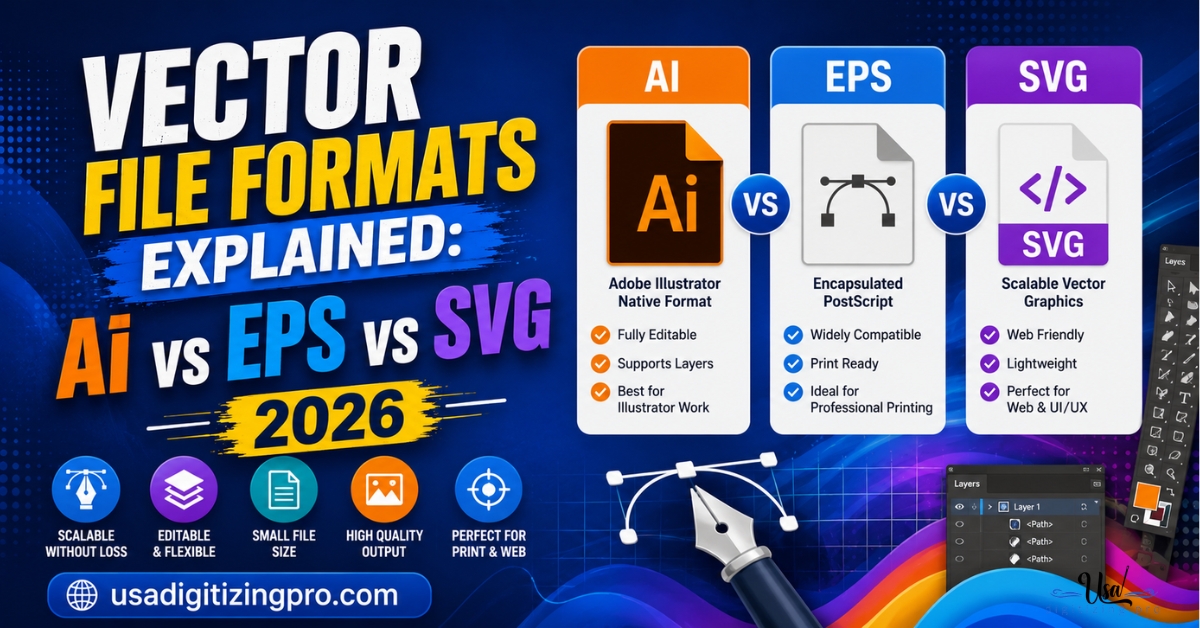
Ask a printer or sign shop for artwork and they’ll often name a specific format instead of just saying vector file. Vector file formats explained simply: AI, EPS, and SVG are all vector formats, but they’re not interchangeable across every use case, and knowing the difference saves a round trip when a vendor rejects a file for being the wrong type. Each format grew out of a different corner of the design and print world, and that history still shapes what each one is best suited for today.
Quick Answer at a Glance
What an AI File Actually Is
AI is Adobe Illustrator’s native file format, saving every layer, effect, and editable path exactly as it exists inside the program. This makes it the most flexible format for further editing, since anyone with Illustrator can open it and adjust anything from color to individual anchor points. Its main limitation is that it requires Illustrator or Illustrator-compatible software to open properly, which isn’t universal across every design and print vendor. For general vector project scope, the vector artwork services overview covers how these files get built from source artwork.
What an EPS File Actually Is
EPS, short for Encapsulated PostScript, is an older format that became a print industry standard precisely because it’s readable across a much wider range of software than AI, including many programs that can’t open a native Illustrator file directly. It holds vector path data in a way that most print production software, screen printing RIP software, and sign-making programs can interpret reliably, which is why it’s still frequently requested for commercial print jobs even though it predates more modern formats.
What an SVG File Actually Is
SVG, Scalable Vector Graphics, was built specifically for the web. Unlike AI and EPS, which are primarily print and design-software formats, SVG displays directly in web browsers without needing a separate viewer or plugin, and it scales perfectly at any size since it’s fundamentally XML-based path data rather than a fixed-resolution image. This makes it the standard choice for website logos, icons, and any vector graphic meant to display digitally rather than print physically.
Why Print Shops and Web Developers Ask for Different Formats
A print shop or embroidery digitizer often wants EPS or a print-ready AI file because their production software is built around those formats and the print workflow assumes physical output at a specific size and color profile. A web developer wants SVG because it needs to render instantly in a browser and scale responsively across different screen sizes without the overhead of a print-oriented file structure. Sending the wrong format to either doesn’t necessarily break the file, but it often means an extra conversion step before it’s usable.
Editability Differences Between the Three Formats
AI files retain the most editability, since they preserve Illustrator’s full layer structure, effects, and live editable text. EPS files retain path editability but generally lose some of the finer program-specific features like editable live effects, since the format is meant to be broadly compatible rather than Illustrator-specific. SVG files are editable through code or vector software, but since they’re often generated for web display, some incoming SVGs from other sources arrive with simplified or flattened structure compared to a native AI file.
Side-by-Side: AI vs EPS vs SVG
How Format Choice Affects the Vector Build Process
When vector artwork is built from a raster source like a photo or scanned logo, the digitizer generally works in a vector program first and then exports to whichever format the client actually needs. Building for AI keeps everything editable for future revisions. Exporting to EPS strips it down to a broadly compatible print-ready format. Exporting to SVG optimizes the path data for web rendering. Requesting the wrong format upfront just means an extra export step later, so it helps to know the final destination before the file is built.
Choosing the Right Format for Your Project
- Ask your print shop or embroidery digitizer which specific format they require before submitting artwork.
- Request AI if you expect to make further design edits yourself down the line.
- Request EPS for commercial printing, screen printing, or sign-making unless told otherwise.
- Request SVG for anything going on a website or digital interface.
- Ask for multiple formats upfront if the same artwork is heading to both print and web use.
A Real Order, Broken Down
A Texas food truck business needed their logo vectorized for three different uses: a printed vinyl decal for the truck, a screen-printed staff shirt, and their new website header. The vinyl decal and screen printing vendor both requested EPS files, matching their production software’s standard input format.
The website developer requested SVG instead, since it needed to display crisply at any screen size without adding page load weight. The source artwork was vectorized once and exported in both formats from the same underlying file, avoiding the need to rebuild the vector work twice for what were ultimately two different delivery needs.
Who Builds These Files
USA Digitizing Pro has built vector artwork in AI, EPS, and SVG formats from its Texas studio since 2015, exporting to whatever format a specific print or digital use requires. Every project is backed by a money-back quality guarantee, with pricing quoted based on the artwork’s complexity.
Frequently Asked Questions
EPS is the most commonly requested format for commercial print production, since it’s broadly compatible across print and screen printing software, though some shops also accept print-ready AI files.
Yes, most vector editing software including Illustrator can export an AI file to SVG directly, though some effects or layer structures may simplify in the conversion.
SVG is built primarily for web display, and not all print production software is set up to read it the way it reads EPS or AI, so it’s worth asking your print shop which format they actually require.
Neither format is inherently higher quality, since both are vector-based and scale without quality loss. The difference is compatibility and editability rather than visual quality.
Generally yes. SVG suits web use best, while EPS or print-ready AI suits commercial printing, so most projects end up needing at least two format exports from the same source artwork.
Yes, EPS files retain editable vector paths, though they typically don’t preserve every program-specific feature, like certain live effects, that a native AI file would.
It doesn’t usually damage the artwork, but it typically means an extra conversion step is needed before the vendor’s software can use the file properly.
Yes, relatively speaking. SVG was developed specifically for web use as browser and digital display needs grew, while AI and EPS both have roots in earlier print and design software history.
Yes, this is common when the same logo or artwork is headed to both print and digital destinations, and it’s more efficient to request all needed formats upfront from the same source build.
Not directly. Pricing is generally based on the complexity of the artwork itself rather than which specific export format is requested.
Picking the Right Vector Format for Your Project
Vector file formats explained plainly: AI keeps things fully editable for ongoing design work, EPS is the safe bet for commercial printing across different software, and SVG is built for the web. Knowing your project’s final destination before requesting a file saves an extra conversion step down the line. USA Digitizing Pro builds and exports vector artwork in whichever format your project actually needs.

RELATED BLOGS
Exclusive Embroidery Patterns: What You Really Own in.
Published October 2, 2026 | By USA Digitizing Pro Team Exclusive embroidery patterns are sold on almost every pattern site in the.
How to Convert JPG to PES File for.
USA Digitizing Pro is a Texas-based embroidery digitizing studio founded in 2015. The team builds machine-ready stitch files for Brother, Tajima, Janome,.
6 COMMENTS
[…] on a business card and on a billboard, which is the property every downstream process depends on. the vector file formats guide covers which format suits which […]
[…] the trace would have, and the resulting file went on to serve their signage and print work too. building one master file for every application covers what to keep once a clean master […]
[…] both file types, and the vector master is what keeps them consistent with each other over time. building one master file for every application covers holding a single source of […]
[…] printing from one source. The practical details of each container are covered in our breakdown of vector file formats, and the work of getting there from a photograph or a logo scan is raster to vector conversion. […]
[…] A vector file describes shapes with mathematical paths rather than a grid of pixels, so it holds its edges at any size. Submission guidelines commonly name AI, EPS, and PDF as the preferred formats precisely because they scale without losing quality. Which container to keep as your own is covered in our breakdown of which vector format to keep. […]
[…] changes, and almost nowhere else. The result is the node economy described in our breakdown of which vector format to keep and in how the two file types […]