
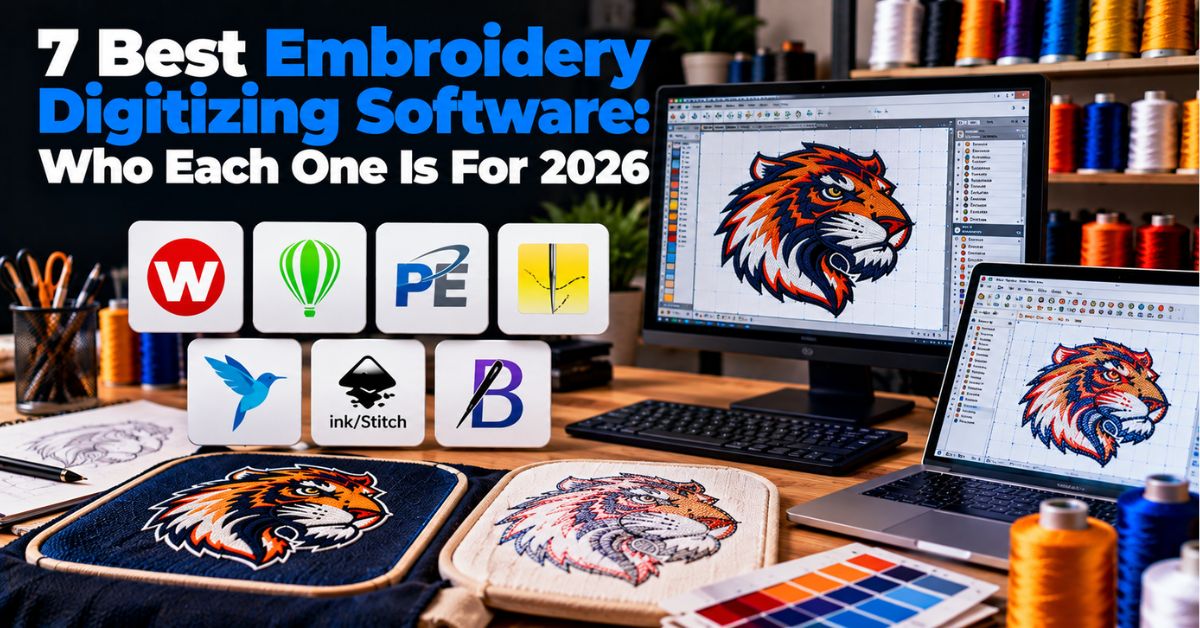
7 Best Embroidery Digitizing Software: Who Each One Is For 2026
Published October 21, 2026 | By USA Digitizing Pro Team
Lists of the 7 best embroidery digitizing software tools almost always rank them, which is the wrong shape for the question. The free option is genuinely the right answer for some people and a professional package is genuinely wasted on them. What matters is volume, skill, and what you intend to build, not which product has the longest feature list.
So this is a matching exercise rather than a ranking. Seven options, who each one suits, what each one cannot do, and an honest note on why the prices you find online do not agree. There is also a section at the end arguing that some readers should not buy any of them, which is awkward for us to write and true anyway.
Quick Answer at a Glance
Here is the shortlist by buyer type. Tier positioning comes from the sources. Dollar figures do not, for reasons explained in the next section.
| Software | Who it suits | Tier |
| Ink/Stitch | Learners, hobbyists, anyone testing the waters | Free, open source |
| SewArt | Simple image-to-stitch conversion | Entry paid, 30-day full trial |
| Embrilliance | Buyers who want to add capability in steps | Modular, mid |
| Hatch Embroidery | Small apparel brands wanting previews | Mid |
| Chroma | Unverified, see the note in its section | Unclear |
| Wilcom EmbroideryStudio | Full-time digitizers | Premium professional |
| Tajima DG by Pulse | Production floors and multi-user shops | Professional, four grades |
Why This Is Not a Ranking
Two things make a straight ranking misleading, and both are worth understanding before the list.
The Software Is the Third Variable
Trade guidance on this craft names three knowledge areas as necessary, materials and equipment, technical embroidery knowledge, and software, with software only one of the three. The same body of guidance notes that two providers can use the same software on the same logo and deliver the same output formats and still produce completely different results, with the difference coming from the decisions made while building the file. Our piece on what it takes to learn the craft covers that progression.
Which means upgrading software does not upgrade output. It widens what you are able to attempt. Those are different purchases and people routinely buy the second expecting the first.
Published Prices Conflict
We went looking for current US prices and found contradictions rather than answers. One source lists Wilcom EmbroideryStudio at around $2,199 as a one-time purchase or from $69 per month depending on edition and add-ons. Another puts it above $3,000. Hatch appears in a $200 to $1,000 band in one listing. Embrilliance shows at $150 plus in one place while another roundup hides its tier prices behind check-price links. A marketplace listing showed Chroma starting at $19, which is a reseller page rather than an official price.
Those cannot all be right, and we are not going to pick one and present it as fact. Editions, modules, regional pricing, and promotions all move these numbers, which is exactly why roundups disagree. Treat any price you read in an article as a rough signal and get the current figure from the vendor.
The 7 Best Embroidery Digitizing Software Options by Buyer Type
Each entry below says who it is for, what verified detail we have, and where its ceiling sits. We also state how well each one is documented, because that varies a lot.
1. Ink/Stitch, for the Curious and the Budget-Free
Well documented. Ink/Stitch is a plugin for Inkscape, which is itself a free vector illustration program, and it runs on Windows, Mac and Linux. It exports common machine formats including PES, DST and EXP, and supports satin, straight and fill stitches. Its developers state the goal plainly: approachable for hobbyists while providing the power professional digitizers need. Because it lives inside a vector program, it also sits naturally next to raster to vector conversion work.
Who it suits: anyone learning, anyone whose volume does not justify a purchase, and anyone on Mac or Linux, which narrows the paid options considerably. The ceiling is the learning curve rather than the price, since free software still demands the same craft knowledge. Note that the common claims about free software being capped on stitch count or design size appeared only on sources that read as machine-generated, so we are not repeating them as fact.
2. SewArt, for Simple Conversion Work
Well documented. SewArt converts raster images including JPG, PNG, TIF and BMP, and vector images including SVG, EMF and WMF, into embroidery file formats. It offers automated pattern fills and a manual satin fill tool. Its free version is a fully functional 30-day trial rather than a permanently limited edition, which makes it unusually easy to evaluate honestly.
Who it suits: someone whose work is mostly turning existing images into stitchable files rather than building complex designs from scratch. The ceiling is ambition. Conversion tools handle conversion, and a logo that needs rebuilding rather than tracing is a different kind of job.
3. Embrilliance, for Buying Only What You Need
Moderately documented. Embrilliance is sold in tiers, with Essentials, Enthusiast and StitchArtist levels appearing across listings. We could not confirm current tier prices, since one roundup listed it at $150 plus while another kept its prices behind check-price links.
Who it suits: buyers who would rather start small and add capability as they need it, instead of paying once for a package where most of it goes unused. The modular model is the actual selling point. The ceiling is that stepping up through tiers can end up costing more than a single purchase would have, so it pays to look at where you expect to be in two years rather than only at the entry price.
4. Hatch Embroidery, for Small Apparel Brands
Moderately documented. Hatch is described as suited to apparel brands, with photorealistic previews and auto-digitizing among its named features, and appears in a $200 to $1,000 band in one listing. Previews matter more than people expect for client approval work, though they are not a substitute for a sew-out, which our notes on what good stitch construction looks like explain.
Who it suits: a small brand or shop producing its own designs, where showing a client something convincing before production has real commercial value. The ceiling is auto-digitizing, which is a starting point rather than a deliverable.
5. Chroma, the One We Could Not Verify
Poorly documented, and we are including it with that label rather than quietly dropping it. Chroma appears in US software marketplace listings, including one showing a starting price of $19, which is a reseller listing and almost certainly not an official figure. We found no reliable account of its feature set in US sources.
Who it suits: unclear from the available evidence. If it is on your shortlist, treat every third-party description of it with suspicion and get the specification and price from the vendor directly. We would rather say that than manufacture a paragraph of plausible-sounding detail.
6. Wilcom EmbroideryStudio, for Full-Time Professionals
Well established as the premium tier, with prices that conflict across sources as described above. Reported drawbacks include the price point and a Windows-focused system, which matters if you work on a Mac. This is the tier where the fine control over underlay settings built for cap panels and over stitch types and the widths they need is assumed rather than optional.
Who it suits: someone digitizing most days as their actual job. The ceiling is not the software, it is you. Buying the professional tier at level two of the craft produces level two files with more buttons available, and trade guidance is consistent that a good foundation in digitizing takes something in the range of 6 to 18 months to build.
7. Tajima DG by Pulse, for Production Floors
Well documented. Tajima DG by Pulse comes in four grades, described as applicable to any level, with the top Master series including automatic digitizing, photo-to-stitch conversion and special fills. The current DG17 release adds mass upload to PulseCloud and automatic thread-color matching from the Creator tier upward. DG16 features reported include One Click Conversion between stitch types, a Drag Anchor Path tool for digitizing logos, and over 180 fonts. PulseCloud is a standard feature and can store up to 100,000 design files. A free companion app called Ambassador lets clients view and make minor edits to designs without owning the full package.
Who it suits: a shop with multiple machines, multiple people, and a real need to move files and approvals around. That client viewer app and the cloud storage are workflow features rather than digitizing features, and on a busy floor workflow is often the bottleneck. The ceiling is that none of it helps a one-person operation doing a handful of files a month.
The Shortlist in One Table
| Software | How well documented | Its ceiling |
|---|---|---|
| Ink/Stitch | Well | Your own skill, not the tool |
| SewArt | Well | Conversion, not construction |
| Embrilliance | Moderately | Tier creep over time |
| Hatch | Moderately | Auto-digitizing is a start, not a finish |
| Chroma | Poorly, see its section | Unknown |
| Wilcom | Well as a tier, prices conflict | Windows focus, and your skill level |
| Tajima DG by Pulse | Well | Overkill for a one-person shop |
The Four Hidden Costs
The purchase price is the part everybody compares and the smallest part of the real number. Four costs sit behind it.
Subscription Versus One-Time
The same product can be offered both ways, which is part of why published figures conflict. One source describes Wilcom as available either as a one-time purchase or from a monthly fee depending on edition. A subscription is cheaper to start and never stops, and a perpetual license is a larger single number that ends. Which is better depends entirely on how long you will keep using it, so work out the three-year figure for both before deciding.
Modules and Add-Ons
Tiered and modular products are the norm here. Embrilliance sells in levels, Tajima DG comes in four grades with features appearing only from certain tiers upward, and Wilcom pricing is described as varying by edition and optional add-ons. The practical consequence is that the headline price is for a configuration that may not include the one capability you bought it for. Check which tier contains the specific feature you need before comparing anything.
The Learning Curve Is the Biggest Line Item
This is the cost nobody puts in a comparison table. Practitioner estimates put a good foundation in digitizing at 6 to 18 months, and the person giving that estimate has been digitizing since 1994 and says she is still learning. Historically the craft was taught by apprenticeship, with one master digitizer reportedly taking about ten years to work up through the industry. Against that, basic proficiency with the embroidery machine itself is estimated at roughly 3 to 6 hours. The faults that fill those early months are the ones in our list of digitizing mistakes and their causes. Those figures come from trade blogs and forum posts rather than formal research, and they are consistent enough to plan around.
Price the hours. Six months of evenings is a real cost even though no invoice arrives for it, and it is the reason most shops that buy software still outsource their difficult files.
The Outsourcing Break-Even
Here is the arithmetic we are obliged to show you even though it can cost us a sale in one direction and win one in the other. Outsourced digitizing with us starts at $15 for designs under 5 inches. So a mid-tier package at a few hundred dollars is somewhere in the region of twenty files, before you have learned anything. A premium package is many times that. Our logo digitizing and vector artwork services both work this way.
The honest reading cuts both ways. If you need a handful of files a year, buying software is a hobby purchase rather than a business decision and outsourcing is simply cheaper. If you are editing files constantly, adjusting for new garments weekly, or need same-hour turnaround you control yourself, owning the software wins and keeps winning. The break-even is not a dollar figure, it is whether digitizing is something you do occasionally or something you do.
How to Trial Software Properly
Most of these offer a trial in some form, and SewArt’s is a fully functional 30-day version. Trials get wasted because people explore features instead of testing output.
Test the Same Logo Everywhere
Use one real logo, at one real size, on one real garment, in every package you trial. Then sew all of them out on that garment and compare the results rather than the interfaces. Confirm the trial exports the machine file formats your machine needs, since a file you cannot load is not a result. And compare against a professionally built file of the same logo, because without a reference point every output looks acceptable on screen.
Buying Checklist
Work through these before you pay for anything. Most of them cost nothing to check and several change the decision.
- Count the files you genuinely expect to build per month.
- Multiply that by an outsourced price and compare to three years of software cost.
- Confirm the software runs on your operating system, since several are Windows-focused.
- Confirm it exports the exact formats your machines need.
- Identify which tier or module contains the one feature you are buying it for.
- Get the current price from the vendor, not from a roundup.
- Compare the one-time and subscription options over three years.
- Budget learning time honestly, in the range of months rather than weeks.
- Trial with one real logo on one real garment, and sew it out.
- Decide in advance which difficult jobs you will still outsource.
A Real Order, Broken Down
A New Braunfels uniform shop asked us which package to buy. They ran two single-head machines, did mostly left chest logos on polos and the occasional cap, and were producing roughly four new designs a month. They had been quoted on a premium package at a trade show and were close to buying it.
The arithmetic did not support it. Four designs a month at our under-5-inch rate is $60 a month of outsourcing, and the premium package plus the months of learning would have taken years to pay back at that volume. What they actually needed was not the ability to build files, it was the ability to make small edits without waiting on anyone, which is a far smaller requirement.
We suggested they trial a free option and an entry paid one with a real logo, keep outsourcing new builds, and revisit the decision if their volume tripled. They went with the free route for edits. Eighteen months later they still outsource new designs and they have not asked about the premium package again.
The useful detail is that the trade show pitch was not dishonest. That package is excellent and it was simply sized for a business four times larger than theirs.
Who Builds These Files
USA Digitizing Pro has been building embroidery and vector files from a Texas studio since 2015. We are an obvious interested party in a software buying decision, which is why the break-even section above is written to be used against us where the numbers say so.
Digitizing starts at $15 for designs under 5 inches and $25 for designs above 5 inches, with 2 to 4 hour turnaround and a money-back quality guarantee. You keep the production file, and we will tell you the size and fabric it was built for.
Reach us at sales@usadigitizingpro.com or +1 (830) 321-7832.
FAQs abou 7 best embroidery digitizing software
There isn’t one. Among the 7 best embroidery digitizing software options, the right pick depends on your volume, operating system, and skill level rather than on features.
Yes. Ink/Stitch is free and open source. SewArt’s free version is a 30-day trial, not a permanent free edition.
Inkscape, which is also free. Ink/Stitch is a plugin for it and runs on Windows, Mac and Linux.
Only temporarily. The demo has full retail functionality and expires after 30 days.
Editions, modules, subscriptions and reseller listings all differ. We found Wilcom quoted both near $2,199 and above $3,000, so check the vendor directly.
No. Software is one of three knowledge areas alongside materials and technical embroidery knowledge. Skill decides output, not the package.
No. Treat it as a starting point that gets rebuilt by hand, especially for small lettering.
No. Two people using identical software on the same logo can produce completely different results, because the build decisions differ.
Count your monthly files. A few a year favors outsourcing at $15 per design. Constant edits and same-day control favor owning software.
Whatever your machine reads. Confirm that during the trial, since Ink/Stitch for example exports PES, DST and EXP among others.
Pick for Your Volume, Not for the Feature List
The free option is real, the premium options are excellent, and neither fact tells you which to buy. Volume does. Operating system does. Honest self-assessment about how many months you will spend learning does. And a comparison against simply paying someone for the file does, which is the calculation missing from every roundup including, until now, our earlier software roundup.
One last thing worth repeating because it is the most counterintuitive finding in all of this. Better software does not produce better files. It produces more options, and options are only worth paying for once you know which one you want.
Follow Us

RELATED BLOGS
Exclusive Embroidery Patterns: What You Really Own in.
Published October 2, 2026 | By USA Digitizing Pro Team Exclusive embroidery patterns are sold on almost every pattern site in the.
3D Puff Embroidery Digitizing Tips: Foam and Width.
Published September 10, 2026 | By USA Digitizing Pro Team Puff either cuts clean or it makes a mess, and the difference.
1 COMMENT
[…] should understand how specific threads, needles, and fabrics react when used with each other. The digitizing software options available all assume you already have the other […]