

Exploring the Power of Vector Artwork: One File, Every Application 2026
Published September 11, 2026 | By USA Digitizing Pro Team
Most business owners meet vector artwork the same way: a vendor rejects the logo they sent and asks for a vector file instead. It happens with sign shops, embroiderers, screen printers, and promotional products suppliers, usually in that order and usually over a few frustrating weeks. The power of vector artwork is not really about scalability in the abstract. It is that one correctly built file satisfies every one of those vendors, and a pile of PNGs satisfies none of them.
Quick Answer at a Glance
| Question | Answer |
|---|---|
| What is vector artwork? | Graphics built from mathematical paths rather than a grid of pixels |
| Why does it scale without quality loss? | The paths are recalculated at any size instead of stretched |
| Which vendors require it? | Screen printers, embroiderers, sign shops, promotional suppliers |
| What formats does it come in? | AI, EPS, SVG, and print-ready PDF |
| Can one file serve every use? | Yes, a single master exports to whatever each vendor needs |
| What if I only have a PNG or JPG? | It can be converted, which is a rebuild rather than a file save |
| What does vector conversion cost? | Starting at $15 for designs under 5 inches, larger work quoted |
What Makes Vector Different
The distinction sounds technical and has entirely practical consequences. Understanding it explains every vendor request you will ever get.
Paths Instead of Pixels
A raster image, meaning a JPG, PNG, or GIF, is a fixed grid of coloured squares. A vector file stores mathematical descriptions instead: points, lines, and curves that define shapes. Nothing in a vector file has a resolution, because there are no pixels to run out of. The shapes are instructions for drawing, and they get drawn fresh at whatever size is asked for.
Why Scaling Works
Enlarge a raster image and the software has to invent pixels that were never there, which is why blown-up JPGs look soft and blocky. Enlarge a vector and the same equations simply produce a bigger shape with edges as crisp as before. The same file works on a business card and on a billboard, which is the property every downstream process depends on. the vector file formats guide covers which format suits which destination.
The One Master File Principle
This is where vector stops being a technical curiosity and starts saving real money. The point is not owning a vector file, it is owning the right one and exporting from it.
What Exports From a Single Master
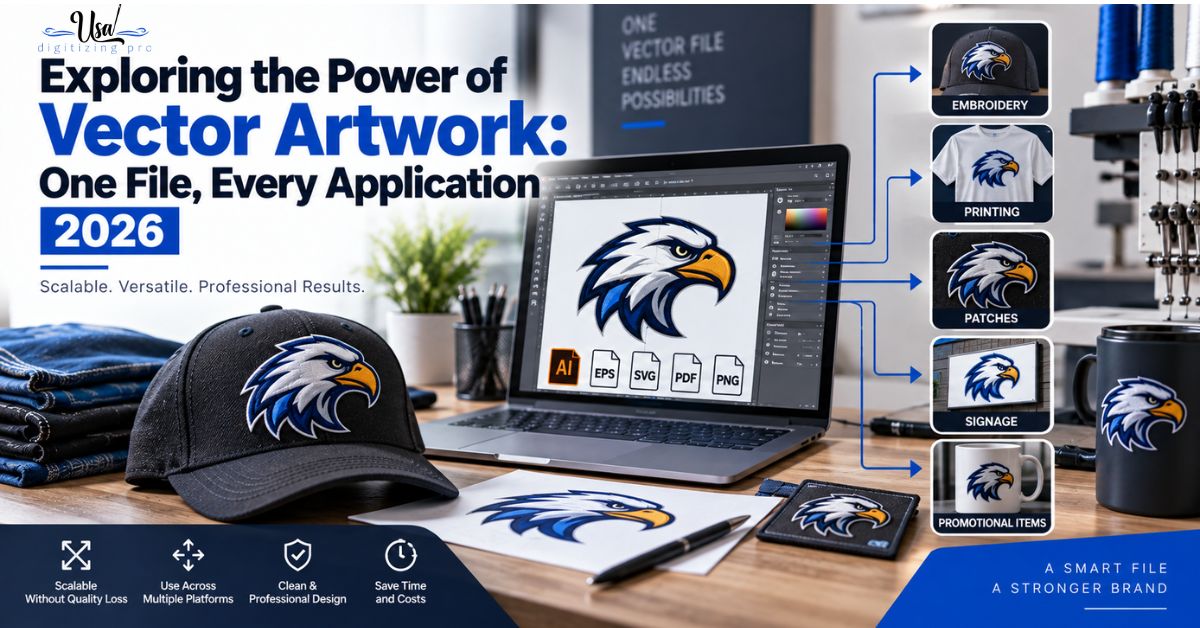
A properly built vector master becomes an SVG for the website, a PNG for social media, an EPS or print-ready PDF for business cards, brochures, packaging, banners, and signage, and the source artwork an embroidery digitizer or screen printing separator works from. Every one of those is an export, not a redesign. The master itself never changes.
What It Saves You
Without a master, each new application means someone recreating the logo from whatever image was available, and each recreation drifts slightly from the last. Colours shift, proportions change, and after a couple of years the brand has four subtly different versions in circulation. A single master eliminates both the recurring cost and the drift, which matters more than the cost over time.
What Each Production Method Needs
Vendors ask for vector for different reasons, and knowing which reason applies makes the conversation shorter. These five cover almost every request a small business will field.
| Method | What It Needs From the Vector | Why |
|---|---|---|
| Screen printing | Clean closed paths, separable flat colours | Each colour becomes its own screen |
| Embroidery digitizing | Unambiguous edges at the finished size | Stitch boundaries follow the path exactly |
| Signage and large format | Any size without quality loss | Output may be several feet wide |
| DTG and sublimation | Sharp edges, accurate colour definition | Print resolution exposes soft edges |
| Promotional products | Small-scale legibility, simple shapes | Imprint areas are tiny and often single colour |
Screen Printing
A screen printer needs each colour in the design isolated onto its own screen, and that separation works from clean closed vector paths. Trying to separate a raster logo means tracing boundaries the file never defined precisely, which introduces error at exactly the stage where registration matters. the colour separation service covers what happens to the artwork after it arrives.
Embroidery Digitizing
A digitizer converts shapes into stitch paths, and those stitches follow the artwork’s boundaries. A soft or ambiguous edge in the source means the digitizer is deciding where the boundary should be rather than reading it. Vector removes that guesswork, which is why it is the preferred starting point for logo digitizing. the logo embroidery digitizing service covers the build process from artwork onward.
Signage and Large Format
Sign shops work at sizes where raster artwork fails visibly. A logo that looks fine at two inches on a screen becomes a blur at four feet on a storefront. Vector is not a preference here, it is the only thing that produces usable output, which is why sign shops are often the first vendor to send a business owner looking for a vector file.
DTG, Sublimation, and Heat Press
These methods print at resolutions high enough to reveal any softness in the source artwork. They are more forgiving of raster input than screen printing or signage, since they can print a high resolution image directly, but the edges of a logo still read noticeably crisper from vector. For anything carrying brand identity rather than a photographic design, vector is worth supplying.
Promotional Products
Pens, keyrings, and similar items have imprint areas measured in fractions of an inch, often reproduced in a single colour. Artwork has to be simplified aggressively while staying recognisable, and that simplification is far easier from vector paths than from a pixel image. This is why promotional suppliers almost universally require vector.
Where Businesses Get Caught Without It
The absence of a vector master rarely causes a crisis on its own. It causes a series of small delays and costs that add up quietly.
The Vendor Rejection
The common version is a quote arriving with a note that the artwork supplied cannot be used. The job stalls while someone finds the original designer, or discovers the designer has closed, or realises nobody ever received anything beyond a PNG in an email. Each vendor asks separately, and the same scramble repeats.
The Repeated Redesign Cost
The more expensive version is paying for the logo to be recreated each time, sometimes by different people, producing versions that no longer match. Converting once to a proper master costs a fraction of that and ends the cycle permanently. the raster to vector conversion walkthrough covers what conversion actually involves.
Getting a Vector Master Made
If the file does not exist, creating one is straightforward and worth doing properly rather than cheaply, since it becomes the source everything else derives from.
Converting From What You Have
Conversion means rebuilding the logo as vector paths using the best available image as reference. It is a redraw rather than a file conversion, which is why automatic tracing tools produce poor results on anything with texture, gradients, or soft edges. A clean manual rebuild produces paths that behave correctly in every downstream process.
What to Ask For
Ask for the layered master in AI or EPS, plus SVG for web use and a print-ready PDF. Request exact colour references rather than approximations, since brand colours need to be reproducible across ink, thread, and vinyl. If a single colour version is likely to be needed for promotional items or embroidery on dark garments, ask for that at the same time. the print versus embroidery artwork requirements covers the differences between those two destinations.
Building Your Brand File Set
Treating vector as one item on a short asset list, rather than as a single file, is what keeps future vendor requests from becoming projects.
Asset Checklist
- Layered vector master in AI or EPS, kept somewhere the business controls.
- SVG export for website and digital use.
- Print-ready PDF for general print vendors.
- A single colour version for promotional items and dark garment work.
- Documented colour references for every brand colour.
- A simplified small-scale version if the full logo loses legibility below an inch.
A Real Order, Broken Down
A Texas landscaping company opened a second location and needed truck decals, embroidered crew shirts, yard signs, and branded water bottles inside the same month. Their logo existed as a PNG from a web designer who had closed the business years earlier. Three of the four vendors rejected the file. One accepted it and produced decals with visibly soft edges that did not match the shirts. Converting once to a proper vector master, then exporting what each vendor needed, resolved all four jobs and left the company holding the asset for everything afterward. The conversion cost less than the decals they had to reprint. the silhouette art service covers the related single colour work that suits small imprint areas.
Who Builds These Files
USA Digitizing Pro builds vector masters and conversions from its Texas studio, redrawing artwork as clean paths rather than auto-tracing it, and exporting to whichever formats a project’s vendors require. Pricing starts at $15 for designs under 5 inches, with larger or more complex work quoted individually and a money-back quality guarantee. Service details are on the vector artwork page.
Frequently Asked Questions
Graphics built from mathematical paths, meaning points, lines, and curves, rather than from a fixed grid of pixels. Because the shapes are instructions rather than a stored image, they redraw cleanly at any size.
Because their processes work from defined shapes. Screen printers separate colours from paths, digitizers convert paths to stitches, and sign shops output at sizes where raster artwork visibly fails.
Yes, though it is a rebuild rather than a file save. The logo gets redrawn as paths using the image as reference, which is why automatic tracing struggles with texture, gradients, and soft edges.
A layered master in AI or EPS, an SVG for web use, and a print-ready PDF for general print vendors. A single colour version is worth having for promotional items and dark garment work.
One master does, with each vendor receiving an export from it rather than a separate design. That is what prevents the brand drifting into several slightly different versions over time.
Less strictly than for screen printing or signage, since those methods can print a high resolution raster image. Logo edges still read noticeably crisper from vector, so it remains worth supplying for brand artwork.
Imprint areas are very small and often single colour, so artwork has to be simplified while staying recognisable. Simplifying from vector paths is far more reliable than from a pixel image.
Either the job is rejected or the output shows soft, blurred edges at large sizes, since enlarging a raster image means inventing detail that was never in the file.
That depends on your agreement, which is worth confirming in writing. Businesses that do not hold their own master file are the ones who end up paying for repeated recreations.
Pricing starts at $15 for designs under 5 inches, with larger or more complex artwork quoted individually.
One File Does the Work of Twenty
The power of vector artwork shows up the fourth time a vendor asks for it and you already have it. Screen printing needs separable paths, embroidery needs unambiguous edges, signage needs scale, promotional products need simplification, and one properly built master supplies all of them without a single redesign. The businesses that get caught out are not the ones with bad logos, they are the ones who never received the file their logo was built from.
Follow Us

RELATED BLOGS
The Evolution of Embroidery Design and Why It.
Published September 21, 2026 | By USA Digitizing Pro Team Ask why embroidery files are called punched, why the format your machine.
CMYK vs Spot Color Screen Printing: Run Size.
Published August 17, 2026 | By USA Digitizing Pro Team Most guides compare CMYK and spot color screen printing on image quality.