Vector Artwork Services
Vector Artwork: What It Is, Why Printers Require It and How to Get It Right in 2026
You submit your logo to a print shop and the reply comes back fast. Three words: send vector file. If you have no idea what that means you are already behind. This happens to business owners across the US every day. The file format your logo lives in decides whether your brand prints sharp or looks like a blurry scan of a bad photocopy. This guide covers what vector artwork actually is, why every printer and embroidery studio asks for it and what your options are when you only have a JPEG sitting in your email.
Quick Answer
| Question | Short Answer |
|---|---|
| Why do printers require it? | Pixel files blur when enlarged. Vector files stay clean from a half-inch badge to a six-foot banner. |
| Which formats are vector? | AI, EPS, SVG, PDF with vector content and CDR. |
| Can I convert a JPG to vector? | Yes. A specialist manually redraws the design and delivers a clean editable file. |
| How fast is the turnaround? | As quick as 2 to 4 hours for standard designs at USA Digitizing Pro. |
| What does it cost? | Logos under 5 inches start at $15 at USA Digitizing Pro. Complex work is quoted before starting. |
What Is Vector Artwork
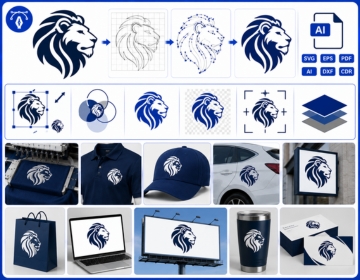
Vector artwork is digital art stored as a set of math instructions. Every single shape within the file relies on a specific start point, an end point, and a connecting path. The design software simply processes these coordinates to recreate the artwork at any size you require. The art never degrades because there are no pixels being stretched. The file simply redraws.
Standard formats like JPEG and PNG are what most people usually encounter. Instead of paths, these files save images by mapping out a massive grid of tiny color filled squares known as pixels. At small sizes on a screen they look fine. Push them beyond their original dimensions and the squares become visible. Edges turn jagged. Fine text falls apart. Print shops see this problem every day from clients who did not know their file format mattered.
The Math Behind the Magic
Every element in a vector file is a path. Picture a straight line connecting two points. Now add a curve between them and you have a bezier path. Enclose several paths into a shape. Fill that shape with a color and you have one element of your logo. Repeat that process for every letter and graphic in your design and you have a complete vector file. The whole thing weighs almost nothing as a file and redraws perfectly at any size from a business card to a truck wrap.
What Software Creates Vector Art
Adobe Illustrator is the tool most designers and print shops use. CorelDRAW is the second most common option and is especially popular in sign shops and older print environments. Inkscape is free and open source and handles the same basic tasks. All three save to their own native formats but can export to the universal file types that production studios accept.
Vector vs Raster: The Practical Difference
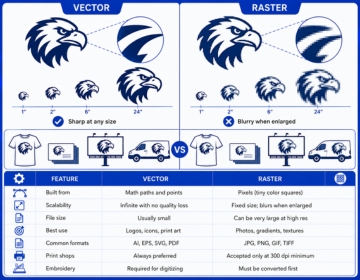
By default, smartphones and everyday consumer applications save images in raster formats. This explains why the average person typically shares a PNG or JPEG file whenever a company requests their official logo. Raster works on screens because screens display images at a fixed size. The file breaks down the moment print production tries to scale it beyond what the pixel count can support.
What Happens When You Scale a Raster File
When you blow up a pixel based image, the editing software is forced to guess and fill in the missing color details. This automatic guesswork is exactly what causes that familiar blurring, pixelated color bands and fuzzy, distorted edges. A logo that looks clean at 200 pixels wide might look acceptable on your phone screen. Run that same logo through a commercial screen printer at 12 inches wide and the flaws show on every shirt.
What Happens When You Scale a Vector File
The math recalculates. Nothing blurs. Nothing breaks. The output looks identical at one inch and identical at one hundred inches. One properly built vector file handles every branded application a company will ever need. Business cards. Shirts. Trade show banners. Signage. Vehicle wraps. One source file covers everything forever.
Vector vs Raster at a Glance
| Feature | Vector | Raster |
|---|---|---|
| Built from | Math paths and points | Pixels (tiny color squares) |
| Scalability | Infinite with no quality loss | Fixed size; blurs when enlarged |
| File size | Usually small | Can be very large at high res |
| Best use | Logos, icons, print art | Photos, gradients, textures |
| Common formats | AI, EPS, SVG, PDF | JPG, PNG, GIF, TIFF |
| Print shops | Always preferred | Accepted only at 300 dpi minimum |
| Embroidery | Required for digitizing | Must be converted first |
Vector File Formats Explained
Not every file extension that sounds like a vector format actually contains vector art. A PDF can hold clean scalable paths or a flat embedded photo depending on how it was exported. Knowing the difference saves production delays and rejected file submissions.
AI (Adobe Illustrator)
AI is the native Illustrator format. Every layer, path and color stays fully editable. Print shops and embroidery studios prefer it when they need to adjust colors or separate individual design elements. If you commission a logo from a designer and pay for it, ask for the AI file before the project wraps. That file is yours and you will need it.
EPS (Encapsulated PostScript)
EPS predates AI and still runs through a huge number of US commercial print workflows. It opens across software platforms and works with decades of printing hardware. It handles transparency less smoothly than AI but is completely solid for flat-color work like screen printing and standard logo applications.
SVG (Scalable Vector Graphics)
SVG stores paths as XML code that web browsers read natively. It is the correct format for website icons, app graphics and anything that needs to scale on screens. SVG files can serve as starting art for embroidery digitizing but still need a human to convert them into an actual stitch file. The SVG defines what the design looks like. The digitizer decides how it gets stitched.
PDF (Portable Document Format)
A PDF exported from Illustrator with all paths intact is a proper vector file. That same PDF exported from Photoshop with a raster image embedded is not. The extension is the same. The content is completely different. Always ask what software the PDF came from before trusting it for production.
CDR (CorelDRAW)
CDR is the native format for CorelDRAW. Sign shops and some older print studios run on CorelDRAW. The files are fully editable inside that software but need converting to AI or EPS for studios that do not license it. If you are working with a sign shop, CDR files are worth asking for.
Why Every Decoration Method Needs Vector Artwork
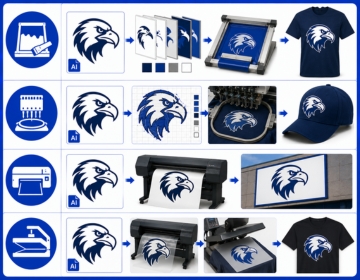
Screen printing, embroidery, large-format signage and heat transfer printing all operate differently but share one requirement. They all need clean art with defined edges and exact color boundaries. A blurry raster file does not just look bad on the screen. It costs real money when a production run fails because the artwork was not ready.
Screen Printing
Screen printing burns each color in a design onto a separate mesh screen. Ink pushes through the open areas of that screen onto the shirt. For that process to work the artwork must have hard clean edges between colors so each screen separates accurately. Vector paths give you those edges. Raster files with soft anti-aliased edges and blended tones create messy separations that waste screens and produce muddy prints.
Embroidery
An embroidery machine does not read a picture. It reads a stitch file. Before that stitch file can be built a human digitizer maps every element of the design onto a grid of stitch paths. That person needs clear source art to work from. A clean vector file shows exact shape boundaries and exact colors. A blurry JPEG leaves the digitizer guessing which creates uneven fill coverage and misaligned outlines on the finished garment.
Large Format and Signage
Vinyl cutters and wide-format printers work at sizes that expose every weakness in a pixel file. A logo at 72 pixels per inch looks fine on a laptop monitor. Stretch that same file to three feet wide and it turns into a soft mess. Vector art redraws at any scale the cutter or printer requires. No resolution setting. No size limit.
DTF and Heat Transfer
Direct to film printing has taken over a big share of the US apparel decoration market since 2022. It handles fine details and works on any fabric type. Even with the quality DTF offers, starting from a clean vector file speeds up the prep work and gives the operator clean color data before the film rolls.
How to Tell If Your Logo Is Already a Vector File
Most clients are unsure what they actually have sitting in their files folder. A few quick checks will tell you.
Look at the Extension
Files ending in .ai, .eps or .svg are vector formats. Files ending in .jpg, .png, .gif or .tiff are raster. A .pdf could be either depending on how it was exported. When you are unsure about a PDF ask whoever created it what software they used to save it.
Zoom In
Open the file in any image viewer and zoom to maximum. If edges on letters and shapes stay perfectly sharp it is vector or a very high resolution raster. If you see a grid of small colored squares at the edges that is pixel data confirming a raster file.
Check the File Size
A standard logo in vector format typically stays under 5 MB. A raster version of the same logo built at print resolution can run 20 MB or more. Small file size and sharp edges together usually mean vector. But file size alone is not a guarantee so the zoom test is the most reliable check.
How Vector Conversion Works: Step by Step
If your logo exists only as a JPEG or PNG a professional conversion studio can rebuild it as a clean editable vector file. Here is how the process runs at USA Digitizing Pro.
Submit your file
JPG, PNG, PDF, BMP or a photo of a hand drawn sketch all work. If the design is visible it is workable.
Designer Analysis
A human designer opens the file in Adobe Illustrator and studies every edge, curve and color in the original art.
Manual Tracing
New paths are drawn directly over the original. Every line is traced by hand using the pen tool.
Color Assignment
Each closed path gets a color assignment based on the hex codes, Pantone references or brand guide you provide.
File Cleanup
The file gets cleaned up. Duplicate anchor points removed. Stray paths deleted. Overlapping shapes aligned.
Format Export
Output is exported in the formats you need: AI, EPS, SVG, PDF or CDR.
Delivery
Delivery happens within 2 to 4 hours for standard designs submitted before 3 PM CT.
What Bad Artwork Actually Costs
A uniform supplier based in Houston submitted a four-color company logo as a low-resolution PNG for a 200-piece polo shirt order. The screen printer rejected the file and asked for a vector version. The supplier spent three days tracking down a conversion service and paid a rush fee on top of the original order. That delay pushed the delivery past the client's event date.
Had that logo been converted to vector before the first order was ever placed every future shirt run, hat order and signage request would have moved straight into production. One conversion at $15 to $25 protects every branded item order the company places from that day forward.
Why Manual Tracing Beats Auto-Trace Software
USA Digitizing Pro has handled vector conversions from its Texas studio since 2015. Every file is drawn by a human designer. Auto-trace tools read pixel edges and draw paths around the color boundaries they detect. The problem is that pixel edges are inherently soft. The tool produces files loaded with unnecessary anchor points and wobbly curves that look acceptable on screen but fail when a production machine tries to read them at scale.
Manual tracing builds only the anchor points the design actually needs. Curves are clean. Color boundaries are exact. The result is a file that scales the way the original designer intended and opens cleanly in any production software the client uses. USA Digitizing Pro tests every file before delivery to confirm compatibility.
What to Send When You Order Vector Artwork
The quality of the input determines the quality of the output. These guidelines make the process faster and the result more accurate.
- Send the highest quality version of your artwork available. A large JPEG traces more accurately than a compressed thumbnail.
- Include color references. Pantone numbers, hex codes or a brand style guide let the designer match your colors exactly.
- Specify the output formats you need. If your screen printer uses EPS and your web team needs SVG request both at the same time.
- Note the largest size this artwork will ever appear at. If the design goes wider than 12 inches mention it so fine detail gets handled correctly.
- Tell the studio what software your team uses. That determines whether to deliver a native AI file or a universal EPS.
Protecting Your Vector Files for the Long Term
A properly built vector file is a permanent asset for your brand. Treat it the same way you treat your registered trademark.
Back Up the Source Files
Keep the original AI or CDR file, not just exported PDFs. The source file lets any designer in the future open and edit the artwork without starting over. A PDF alone may not allow editing depending on how it was exported.
Name Files Clearly
Give files names that tell anyone exactly what they are looking at. 'brand-logo-2026-RGB.ai' and 'brand-logo-2026-CMYK-print.eps' are useful filenames. 'FINAL v3 USE THIS.ai' is not. Clear naming saves hours when someone needs the right file quickly.
Keep a Brand Asset Folder
Store all approved vector files in one shared folder with a consistent naming system. Include a short note explaining which file is for print, which is for web and which is the embroidery ready version. Anyone on the team can find the right file on the first try instead of sending the wrong one to a vendor.
Frequently Asked Questions About Vector Artwork
Clip art is pre made illustration sold in packs or bundled with software. It can be stored in vector or raster format depending on the source. Vector artwork refers to any art built from scalable math paths regardless of whether it was custom made or purchased. A custom logo and a stock clip art icon are both vector files if they live in an AI or EPS format. The format is what matters for production, not the origin of the design.
You can but the result depends on how complex the photo is. Photos contain thousands of subtle color gradations that do not translate into clean hard edged vector paths. If you try to convert a portrait or a scenic landscape, the final output turns into a stylized graphic drawing instead of looking like an exact realistic copy. Simple objects with clear outlines like a product shot or a mascot drawing convert far more cleanly. For most photo requests a designer simplifies the image into a clean illustration instead of tracing it literally.
Pricing scales with complexity. Simple one color logos with clean lines start at $15 at USA Digitizing Pro. Multi color designs with fine detail, gradients that need rebuilding as flat colors or hand drawn sketches with rough linework take more time and are quoted before work begins. Rush service for first time customers is available at no extra charge. There are no surprise fees because pricing is confirmed upfront on every complex job.
Not directly. Even though a vector file gives a clear map of how the design looks, you can not use it directly on the production floor. Embroidery equipment actually needs a dedicated stitch file that dictates where each needle drops, selects the right stitch patterns and manages how dense the thread work should be. A human digitizer reads the vector artwork and builds that stitch map by hand. The vector file is the starting point and reference. The stitch file is what the machine reads. A studio that offers both services like USA Digitizing Pro can handle both in a single order.
AI and EPS are the formats US print shops and screen printers ask for most often. AI gives the shop full editing access to every path and color layer. EPS is the safer cross platform choice when the shop uses older equipment or different software. When unsure, ask the print shop directly before submitting. Many shops also accept well built PDFs with embedded vector content. SVG is better suited to web use and is less common in commercial print workflows.
You can if you are willing to invest time learning the tools. Adobe Illustrator takes several weeks to reach basic competency and several months before clean logo production becomes fast. Inkscape covers the same core functions for free. Simple shapes and icons become manageable quickly. If your design involves intricate illustrations, unique custom fonts, or several layers overlapping each other, creating a clean file becomes incredibly challenging without proper design experience. Most businesses find a professional conversion at $15 to $25 cheaper than the hours spent learning to produce results that still fall short of production standards.
Get Your Artwork Into Vector Format Today
If your business puts its logo on shirts, hats, signage or any printed product you need a clean vector file in your asset library. Without it every new order starts with a rejection and a delay.
USA Digitizing Pro converts JPG, PNG, PDF and hand drawn sketches into production-ready AI, EPS, SVG and CDR files. Turnaround runs as fast as 2 to 4 hours for standard designs. Logos under 5 inches start at $15 flat with no surprise charges added after. Every file is built by hand, tested before delivery and backed by a full satisfaction guarantee.
How to order in 3 simple steps:
- Upload your file
- Specify your required formats (AI, EPS, SVG, or CDR)
- Get your vector file delivered within 2-4 hours
Rush service available at no extra charge for first-time customers.