

The Significance of Vector Artwork: What Raster-Only Logos Cost You in 2026
Published October 16, 2026 | By USA Digitizing Pro Team
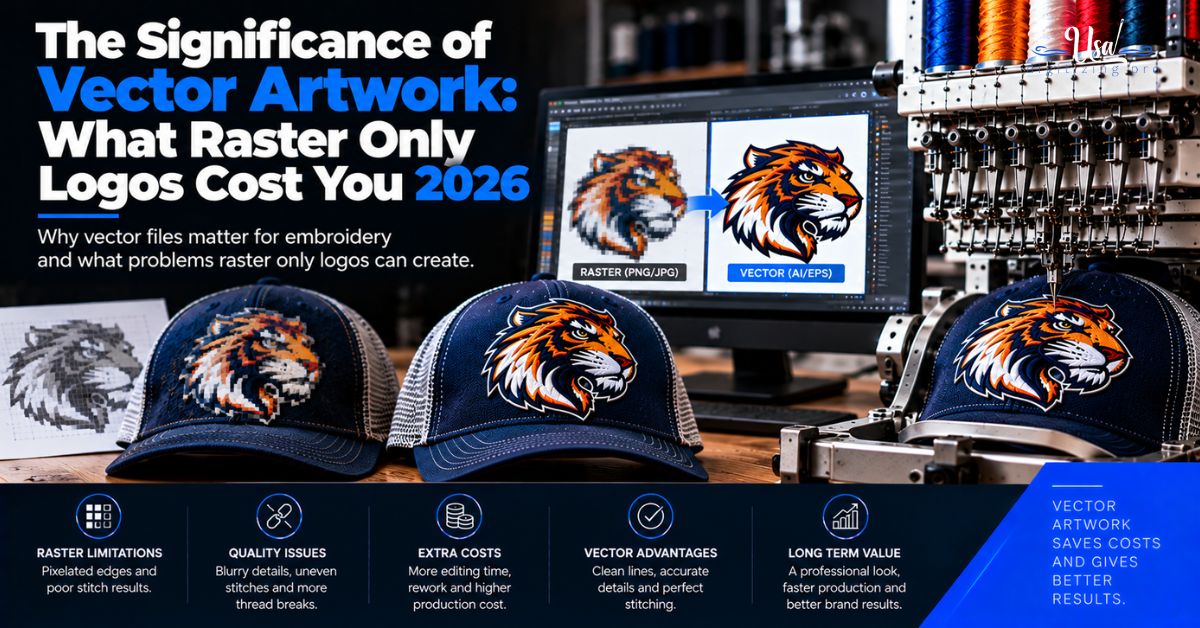
The significance of vector artwork is usually explained with the word scalable, which is true and persuades nobody. Here is the version that does. US print and apparel shops publish what they charge to clean up or rebuild a logo that arrives without vector, and those rates run from a flat $25 up to $75 an hour. If you order from five vendors, you can pay that five times for the same logo.
That is what significance means in practice. Not quality in the abstract, a recurring line item on invoices plus a slower problem most brands never diagnose. This article prices both.
Quick Answer at a Glance
Here is the cost picture in one place. Every third-party figure below is a published vendor rate and is attributed in the sections that follow.
| Cost | What US vendors publish |
|---|---|
| Hourly art rate | $50 to $75 per hour, often with a minimum |
| Typical minimum | A half hour minimum, or a $17.50 floor at one shop |
| Flat fee, simple logo | $25 to $35 |
| Flat fee, complex logo | $50 to $75 |
| Low-resolution rebuild | $65 per hour at one vendor for art under 300 DPI |
| Raster resolution required | At least 300 DPI at final print size |
| Web image resolution | 72 DPI, which will not print |
| Times you pay it | Once per vendor, per format change, indefinitely |
Why Vendors Ask for Vector
Vendors are not being fussy. Each of the three reasons below is a production constraint, and understanding them is what makes the charges stop feeling arbitrary.
What a Vector File Is
A vector file describes shapes with mathematical paths rather than a grid of pixels, so it holds its edges at any size. Submission guidelines commonly name AI, EPS, and PDF as the preferred formats precisely because they scale without losing quality. Which container to keep as your own is covered in our breakdown of which vector format to keep.
The practical result is that one vector file can serve a business card and a building sign. A raster file cannot do both, and no setting makes it able to.
The Resolution Bar Raster Has to Clear
Raster artwork is not automatically rejected. It has to clear a bar. Vendor guidelines generally require at least 300 DPI at the final print size, which is the part people miss, since a file that is 300 DPI at two inches is not 300 DPI at twelve. Getting from a raster original up to a usable vector is the work described in converting a raster logo to vector.
Guidelines also commonly ask for text converted to outlines so fonts do not substitute, and for CMYK or Pantone values rather than screen colors. Both are things a vector master handles once and a raster file cannot handle at all.
Why the Logo From Your Website Fails
This is the single most common submission problem and the explanation is one number. Web graphics are typically 72 DPI, and vendor guidance says plainly that they will not print well. A logo that looks sharp on a monitor is carrying roughly a quarter of the detail density a press needs.
So the file that lives on your own website is usually the worst file to send a printer, which is counterintuitive enough that it happens constantly.
The Five Recurring Costs of Raster-Only Artwork
Here is the part the essays leave out. Not having vector is not a one-time inconvenience. It is five costs, and four of them repeat.
1: Art Charges, Every Time
Shops publish these openly. One label printer lists $75.00 per hour with a half hour minimum charge for creating or re-creating artwork. Another bills $55 per hour with a $17.50 minimum for work beyond minor adjustments, and names logo vectorization from a complex raster file and full logo recreation among that work. A third lists $50 per hour as a flat rate for other art help.
Flat fees are common for straightforward jobs. One printer adds $35 for most simple logos and quotes complex ones separately. Another publishes a tiered schedule of $25 for a simple to average non-vector logo, $50 for above average complexity, and $75 for a complex design. An apparel industry forum thread reports a standard production art charge of $25 to $60 for file cleanup, though that thread dates from 2012 and the figures should be treated as old.
The pattern across all of them is the same. The charge attaches to the job, not to your account. Order again next year and it can appear again.
2: Re-Tracing at Every Vendor
Each vendor does its own cleanup, because each one has to produce its own usable file. Your screen printer rebuilds it for color separation services, your embroiderer rebuilds it for logo digitizing, your sign shop rebuilds it for cutting, and none of them sends the result to the others. That is not uncooperative, it is just how the work flows.
The cost is multiplied rather than shared. Five vendors means five rebuilds of one logo, and the second one is not cheaper for having been done once already.
3: Production Delays
Vendor guidance lists low-resolution images and missing fonts among the common issues that delay production. We did not find a published figure for how long, and we are not going to make one up. What is worth noting is the shape of the delay rather than its size.
An art charge is quoted, then approved, then the work is scheduled, then a proof goes back for sign-off. Every one of those steps happens before your job joins the production queue. On a deadline that sequence is the problem, not the fee.
4: A Quality Ceiling You Cannot Raise
A rebuild from a low-resolution source is an interpretation. The person doing it is guessing at where a curve was meant to go, and in a hurry, for a fee that does not fund careful work. The tells that give away a rushed trace are covered in our notes on digitizing mistakes and their causes, and they show up at the production stage where they cost the most to fix.
That ceiling is fixed by the source file. No amount of skill downstream recovers detail that was never in the image, which means a raster-only brand is permanently capped at whatever the original pixels can support.
5: Paying Again at Every Format Change
Each new production method asks a different question of the artwork. Screen printing wants separated flat colors. Embroidery wants closed paths, expanded strokes, and a reduced palette. Cutting wants a single clean outline. The differences between the first two are set out in what screen printing and embroidery each need, and how the stitch side relates to the artwork side is covered in how the two file types relate.
From a vector master each of those is an adaptation, which takes minutes. From a JPG each one is a rebuild, which takes an art charge. Add a product category and you add another one.
Logo Drift
This is the cost nobody invoices you for, and over a few years it is the expensive one. It has a mechanism, it has symptoms, and it has a fix.
How Drift Happens
Five vendors each re-trace your JPG. None of them is working from the other’s file and none of them is working from an original, because there is no original. Each one makes small independent decisions: where exactly that curve sits, how thick that stroke is, which of two similar blues this is, how much space sits between the mark and the wordmark.
Every one of those decisions is defensible on its own. Together they produce five logos. Design commentary describes the result as a fragmented brand experience, and while that language comes from marketing content rather than research, the mechanism is real and easy to verify on your own shelf.
How to Spot It
Put the physical items side by side. Shirt, cap, business card, vehicle decal, trade show banner. Then check four things: stroke weight, the exact color, the spacing between elements, and the shape of the tightest curve in the mark.
Drift is almost never visible one item at a time, which is why it survives for years. It becomes obvious the moment two items sit together, and it becomes a problem when a customer sees both.
How to Stop It
One master file, held by you, sent to every vendor. That is the whole fix. Our overview of why vector matters for a brand covers the broader case, and vector artwork services is where the file gets built if you do not have one.
The important word is held by you. A vector file that lives only on one vendor’s server solves nothing, because the next vendor still starts from your JPG. Ask for the file, store it somewhere you control, and send it out rather than letting people find your logo themselves.
Significance as Arithmetic
Abstractions do not get budget approved. Numbers do. Here is the same question done as arithmetic, using published rates and nothing invented.
A Five-Vendor Example
Take a business that orders embroidered polos, screen printed tees, printed labels, a vehicle decal, and a trade show banner. Five vendors, one logo, no vector file.
Using the published flat-fee tier of $25 for a simple to average non-vector logo, that is $125 across five vendors if every single job is treated as simple. Using the other published tier of $50 for above average complexity, it is $250. If any of them bills hourly instead, the half hour minimum at $75 per hour is $37.50 before anyone touches the file, and the shop charging $55 per hour with a $17.50 minimum sits between the two.
None of that includes reorders, a new product category next year, or the drift. Against that, one vector build is a single charge that never repeats. The comparison is not close, and it is the reason vendors who charge art fees are often the same ones who will tell you to go get vector made.
One honest caveat. If you order from exactly one vendor, once, and will never order again, paying their art charge is the cheaper route and we would tell you so. The math only turns when there is a second job or a second vendor.
Vector Asset Checklist
This is what owning your artwork properly looks like. Each item closes one of the costs above.
- Hold a vector master in AI, EPS, or PDF, not only a PNG or JPG.
- Store it somewhere you control, not only in a vendor’s account.
- Have text converted to outlines so fonts cannot substitute.
- Record exact color values in CMYK and Pantone, not screen colors.
- Keep a one-color and a reversed version, since many jobs need them.
- Keep an embroidery-ready variant separate from the print master.
- Note the smallest size the logo is approved to be used at.
- Send the vector to every vendor up front rather than waiting to be asked.
- Never let a vendor’s rebuild replace your master file.
- Audit your physical items once a year for drift.
A Real Order, Broken Down
A Fort Worth plumbing company called us about embroidery for 40 work shirts. They sent a PNG pulled from their own website, 72 DPI, about 400 pixels wide. Standard situation and not their fault, since nobody had ever told them otherwise.
The useful part was the conversation that followed. They had been in business eleven years and had ordered shirts, truck decals, yard signs, invoices, and a sponsor banner for a youth league. We asked them to photograph four of those items. The logo differed on all four. The wordmark was noticeably bolder on the truck than on the signs, the blue was not the same blue, and on the banner the small drop icon beside the text had lost its notch entirely, which means someone had traced it from something too small to see the notch.
We built one vector master from the cleanest source they had, which turned out to be a printed invoice rather than any digital file. From that master we produced the embroidery version for the shirts, with the palette reduced and the small icon enlarged enough to hold its notch in thread. They now send the master out instead of the PNG.
Their reaction was the part worth repeating. They were not surprised that the logo needed work. They were surprised that they had been paying for the same work repeatedly for eleven years without noticing it as a pattern, because each individual charge had been small enough to approve without thinking.
Who Builds These Files
USA Digitizing Pro has been building embroidery and vector files from a Texas studio since 2015. We build vector masters from whatever source you have, including printed material when no usable digital file exists, and we deliver the file to you rather than keeping it.
Work starts at $15 for designs under 5 inches and $25 for designs above 5 inches, with 2 to 4 hour turnaround and a money-back quality guarantee. You own everything we deliver, and we do not reuse or resell customer artwork.
Reach us at sales@usadigitizingpro.com or +1 (830) 321-7832.
FAQ’s About Significance of vector artwork
Because vector scales without losing quality, which is why submission guidelines commonly name AI, EPS, and PDF as preferred. A vector master also handles the other things production needs, including text converted to outlines so fonts do not substitute, and exact CMYK or Pantone color values. A raster file can meet none of those requirements reliably.
A file that describes shapes using mathematical paths instead of a grid of pixels. Because the shapes are described rather than sampled, the edges stay clean at any size. That is the whole basis for the significance of vector artwork, and it is why one vector file can serve both a business card and a building sign.
At least 300 DPI at the final print size. The last part matters most. A file that is 300 DPI at two inches wide is not 300 DPI when placed at twelve inches, so the requirement moves with the job. That is one reason a single raster file cannot serve every product the way a vector master can.
Because web graphics are typically 72 DPI, and vendor guidance says plainly that web images will not print well. Screens need far less detail density than presses do. The logo on your own site is usually the worst file to send a printer, which surprises almost everyone the first time.
It is what happens when several vendors each re-trace the same raster logo independently. Each one makes small defensible decisions about curves, stroke weight, color and spacing, and the results diverge.
One File, Paid For Once
Strip the marketing language away and this topic is an arithmetic problem. Published art charges run from $25 flat up to $75 an hour. They attach to jobs rather than to accounts, which means they repeat. Five vendors means five rebuilds, every new product category means another one, and the quality of each rebuild is capped by whatever the original image could support.
A vector master converts all of that into a single charge. It also stops the slow version of the problem, where five independent traces become five slightly different logos that nobody notices until a customer holds two of your items at once.
Follow Us

RELATED BLOGS
Cap Embroidery Design Tips: Artwork Submission Checklist 2026
Published August 5, 2026 | By USA Digitizing Pro Team The artwork a brand owner submits before a design ever reaches a.
How to Convert JPG to PES File for.
USA Digitizing Pro is a Texas-based embroidery digitizing studio founded in 2015. The team builds machine-ready stitch files for Brother, Tajima, Janome,.