

The Art of Vectorization: Six Judgment Calls Behind Every Trace 2026
Published October 17, 2026 | By USA Digitizing Pro Team
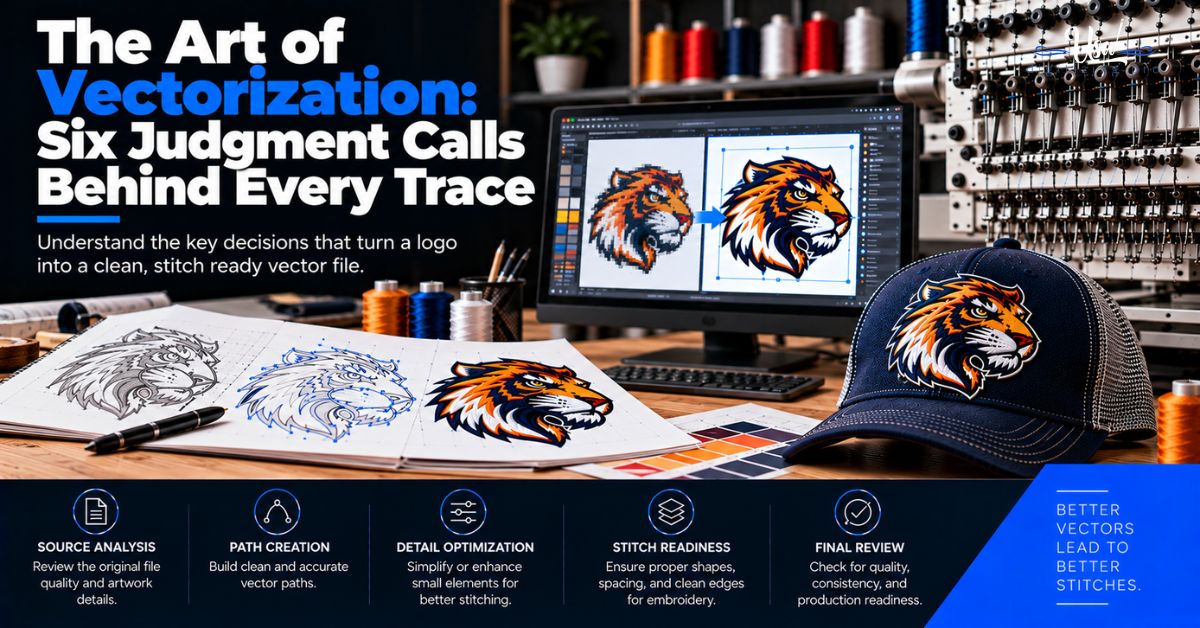
The art of vectorization is not conversion. Nothing converts. The file you send has already lost the information a tracer would need, and what happens next is reconstruction, meaning someone decides what your logo was supposed to look like before compression got to it. Zoom far enough into a JPG logo and there is no edge, only a gradient of guesses.
Six moments in that process are genuinely ambiguous, and how a vectorizer resolves them determines whether the result looks like your logo or like a tracing of a photocopy. This article names all six, explains what the evidence supports in each case, and covers the one question you should ask before any of this starts.
Quick Answer at a Glance
Here is the whole argument compressed. Each row gets a section below with the supporting evidence.
| Problem | What actually causes it |
|---|---|
| No crisp edge to trace | JPEG discards high-frequency detail, leaving compression noise at transitions |
| Blurred boundary pixels | Anti-aliasing, described as normal and unavoidable |
| Thousands of anchor points | Auto-trace output commonly carries excessive points |
| One stroke becomes three paths | Auto-trace traces outside, inside, and middle separately |
| Small features disappear | Tracers miss small or faint features |
| Shapes that were never there | Tracers introduce anti-aliasing artifacts as shapes |
| Lettering looks almost right | Font not identified, or envelope effects not accounted for |
| The fix for all of it | Obtain or rebuild a real vector version |
Why Vectorization Is Reconstruction
Three things have to be understood before the six judgment calls make sense. All three are properties of the file rather than failures of the person working on it.
What the Source File Has Already Lost
JPEG is designed for photographs. It is ideal for images with smooth color and tonal transitions and few areas of harsh contrast or sharp edges, which is the exact opposite of a logo. Compressing a sharp logo edge produces a pattern of compression noise around the transition areas.
The reason is mathematical. Sharp edges are high-frequency content, and the basis functions JPEG uses approximate abrupt changes poorly, so representing them needs more coefficients. Compression then removes coefficients, and the loss is most visible exactly where the edges are. That is why the cleanest part of your logo on screen is the dirtiest part of the file, and it is the underlying reason converting a raster logo to vector is skilled work rather than a button.
What Anti-Aliasing Adds
On top of compression damage, every rendered edge carries anti-aliasing. Intermediate pixels are placed along the boundary to make the edge look smooth to the eye. One Adobe expert puts it plainly: anti-aliasing will cause a bit of a blur at the edges, this is normal and unavoidable, and exporting at higher resolution helps.
So a boundary that reads as one clean line at normal viewing size is, at the pixel level, a band several pixels wide with no single correct position inside it. Every trace of that boundary is a choice about where in the band the real edge sits.
What Auto-Trace Does With the Mess
Automatic tracing is fast. Manual tracing generally takes hours while automatic tracing is rapid, which is the entire appeal. What it buys in speed it gives back in three documented failure modes: it introduces shapes that should not be there, such as anti-aliasing artifacts, it misses shapes that should be there, such as small or faint features, and even where the shapes are correct it can fit poorly chosen curves.
It also produces far too many points. Users consistently report excessive anchor points that make a file unnecessarily complex and hard to edit. That matters downstream, because an over-noded path is worse to work with at every later stage, and it is one of the tells covered in our notes on digitizing mistakes and their causes.
Auto-trace earns its place in one situation. It is best suited to large, high-contrast black and white originals with no gradients or soft blends. A common professional workflow is to auto-trace first and then correct the nodes by hand, which is a reasonable use of it rather than a shortcut around the work.
The Six Ambiguities
Here is the part nobody writes about. These are the six places where the file does not answer the question and a person has to.
1: Where Is the True Edge?
Given a boundary band several pixels wide, built from anti-aliased pixels and compression noise, where does the shape end? Trace the outer limit and every element gets slightly fatter and Trace the inner limit and everything thins. Trace the midpoint and you have made a defensible choice that is still a choice.
The resolution is consistency rather than correctness. Whatever rule gets applied has to be applied everywhere, because a logo where some edges were traced outside and others inside will have stroke weights that no longer relate to each other, and that is visible even when no single edge looks wrong.
2: Sharp Corner or Soft Corner?
Corners are the case where we have to be honest about the limits of what is documented. Research for this article found no source addressing corner behavior directly, so what follows is our own studio observation rather than a cited finding.
In our work, softened edges make the true corner position ambiguous, and tracers tend to resolve that by rounding it off or fitting a curve where an angle belongs. The practical consequence is that a logo with crisp corners in the original often comes back with slightly soft ones, and the softening is uniform enough that nobody notices it as a defect, only as a vague sense that the mark lost its snap. Our habit is to treat ambiguous corners as sharp unless there is positive evidence of an intended radius, because a sharp corner that should have been soft is an obvious error while a soft corner that should have been sharp hides.
3: One Stroke or Three Paths?
This one is documented and it is the most destructive on hand-drawn work. One designer reported auto-trace making separate paths for the outside, inside, and middle of a single stroke, then jumbling them at the slightest imperfection in the hand-drawn lines.
What the file contains is three boundaries. What the artist drew was one line. Deciding that a stroke is a stroke, rather than a set of unrelated outlines, is interpretation, and it is why hand-drawn source material usually needs manual work. Manual vector tracing allows a higher level of control, which is why it is the recommended approach for complex or detailed designs.
4: Gradient or Two Flat Colors?
Anti-aliasing places intermediate pixels between two flat colors. A gradient also places intermediate pixels between two colors. At the pixel level those situations can look identical, so the question of whether a transition was designed or is a rendering artifact has no answer inside the file. Getting it wrong in either direction is costly, and it matters more than usual when the destination is thread, since what screen printing and embroidery each need differ sharply on this point.
The working test is width. An anti-aliased boundary is a few pixels across at the source resolution. A designed gradient spans a meaningful part of the shape. When the band is narrow it gets resolved to a hard edge, and when it is wide the gradient was intentional.
5: Missing Feature or Faint Feature?
Tracers are documented to miss small or faint features, which produces a specific problem. When a detail is barely present in the source, there are two possible explanations: the detail is small and the file is poor, or the detail was never in the original design and what you are seeing is noise.
Those require opposite responses. A faint real feature should be reconstructed, often enlarged. A noise artifact should be deleted. Telling them apart usually needs evidence from outside the file, which is why asking the client for any other version of the logo, including printed material, is often more productive than working harder on the file you were given.
6: Known Typeface or Custom Lettering?
Lettering has an established workflow and most people skip it. The first step is identifying the typeface, since a match makes rebuilding easy, and redrawing letters by hand is a last resort. Converting the image to grayscale and applying a threshold makes the outline easier to read for identification. Our overview of vectorization as a craft covers the broader process.
Two cautions come with it. A matched font may require a paid license, so identification is not the end of the problem. And a plain font match may still not reproduce the original, because envelope or warp effects may have been applied to the lettering in the source artwork. A logo whose wordmark was stretched or arched will not come back right from an unmodified font, no matter how correct the identification was.
Fidelity or Intent
Everything above assumes one goal, and that assumption is the source of most complaints about vector work. There are two legitimate goals and they produce different files.
The Fidelity School
Trace what is actually there. Keep the asymmetry, keep the slightly uneven stroke, keep the wobble in the line. The artifact in front of you is the thing being preserved, flaws included, because those flaws are information.
This is correct for hand-drawn artwork, children’s drawings, signatures, historical marks, and anything where the human hand is the point. Regularizing a child’s drawing into clean geometry destroys the only reason anyone wanted it.
The Intent School
Rebuild what was meant. If that shape was supposed to be a circle, make it a circle and If those two strokes were supposed to match, match them. If that wordmark was set in a typeface, identify it and set it properly. The compressed file is treated as evidence of an original design rather than as the design itself, and the output is often cleaner than the input. This is the right approach for most commercial work, and it is what makes a file usable for logo digitizing and for everything else downstream.
Both schools are defensible. Neither is universally right. The mistake is not picking one, it is failing to agree which one applies before work starts.
Which One Your Job Needs
| Source | Which school | Why |
|---|---|---|
| Corporate or business logo | Intent | The original was designed with regular geometry |
| Hand-drawn art or a child’s drawing | Fidelity | The irregularity is the content |
| Signature or handwriting | Fidelity | A regularized signature is no longer that person’s |
| Old printed mark being revived | Intent, with care | Press artifacts are not design decisions |
| Tattoo or bold illustration | Mostly intent | Usually built on deliberate clean shapes |
| Scanned fabric label or patch | Intent | Weave texture is production, not design |
Where Nodes Belong
One more technical point explains why professional output looks different from automatic output even when both describe the same shape.
Extrema, and Why a Clean Path Has So Few Points
An extrema is a node at a curve’s horizontal or vertical peak, a definition that comes from font software documentation, where tools exist specifically to create one. Font and type work treats those positions as where nodes belong, and the fact that editors ship a dedicated command for it tells you the tooling expects them there. Beyond that definition we are describing our own working standard rather than citing a rule, and ours is that a path should carry nodes at extrema and at genuine direction changes, and almost nowhere else. The result is the node economy described in our breakdown of which vector format to keep and in how the two file types relate.
Auto-trace places nodes where the pixel data changes, which is everywhere, because compression noise changes the pixel data constantly. That is the mechanism behind the excessive anchor points users report. A path with nodes at meaningful positions is editable, scalable, and predictable. A path with nodes wherever the noise was is none of those things even if it looks identical at 100 percent.
Source Quality Checklist
You cannot change how vectorization works, and you can change what the person doing it has to work with. Each item here removes one of the six ambiguities.
- Send the largest version of the file you have, since higher resolution reduces anti-aliasing ambiguity.
- Send a PNG rather than a JPG when you have the choice, because JPEG damage sits exactly on the edges.
- Avoid screenshots entirely, as they are compressed renderings of compressed files.
- Send every version you can find, including printed material, since a second source resolves faint features.
- Say whether the logo contains type and name the typeface if you know it.
- Flag any stretching, arching, or warping applied to the lettering.
- Say whether a visible transition is a designed gradient or not.
- State whether shapes that look circular or symmetrical were meant to be.
- Say which school you want, fidelity or intent, before work starts.
- Ask for the editable master at delivery, not only a flattened export.
A Real Order, Broken Down
A Seguin auto repair shop sent us a logo for embroidery on work shirts. The file was a 900 pixel wide JPG, which is not terrible, and it had been saved and resaved enough times that the edges carried visible compression noise in a band about four pixels wide.
Four of the six ambiguities showed up in one small logo. A wrench crossing a gear sat at an angle, and the gear teeth were small enough that three of them had blurred into the background, which is the faint-versus-missing problem. The shop name was set in a condensed sans that we identified as a close match to a common commercial typeface, except the original had been horizontally squeezed, which is the envelope-effect caution. The gear outline read as a slight gradient at the boundary, which turned out to be anti-aliasing on a band two pixels wide rather than anything designed. And the wrench corners were soft everywhere, uniformly, which is the signature of corner ambiguity rather than of a designed radius.
We asked one question before starting: did they want the logo as it appears on their current shirts, or as it was presumably drawn originally? They chose the original. So we rebuilt it on the intent school. The gear became a true regular gear with all its teeth, the typeface was licensed and reset with the same horizontal squeeze measured from the file, the boundary resolved to a hard edge, and the wrench corners went sharp.
Their reaction was the useful part. The owner said it looked like their logo but better, which is exactly what the intent school produces and exactly what the fidelity school would not have. Had this been his father’s hand-painted sign from 1974, we would have made the opposite choice and kept every irregularity.
Who Builds These Files
USA Digitizing Pro has been building vector and embroidery files from a Texas studio since 2015. We work by hand rather than by button, we ask the fidelity or intent question at intake, and we tell you which of the six ambiguities your file contains before we quote.
Work starts at $15 for designs under 5 inches and $25 for designs above 5 inches, with 2 to 4 hour turnaround and a money-back quality guarantee. See vector artwork services for conversion and redraw work, and our piece on why holding a vector master matters for what owning the file is worth afterward. You keep everything we deliver.
Reach us at sales@usadigitizingpro.com or +1 (830) 321-7832.
FAQs About Art of vectorization
Rebuilding an image as mathematical paths instead of pixels, so it holds its edges at any size. The art of vectorization is that it is reconstruction rather than translation, because compression and anti-aliasing have already removed the precise edge information, so somebody has to decide where the real boundary sits.
For one narrow case, yes. Auto-trace suits large, high-contrast black and white originals with no gradients or soft blends. Outside that it introduces shapes that should not exist such as anti-aliasing artifacts, misses small or faint features, and fits poorly chosen curves. A reasonable professional workflow is auto-tracing first and then correcting the nodes by hand.
Three causes stack. JPEG discards the high-frequency detail that sharp edges are made of, leaving compression noise at every transition. Anti-aliasing adds a few pixels of blur along each boundary, which is normal and unavoidable.
Yes, and the harder question is whether the transition is a gradient at all. Anti-aliasing between two flat colors produces intermediate pixels that can look identical to a designed gradient at the pixel level.
The largest and least compressed thing you have. Prefer PNG over JPG, since JPEG damage sits exactly on the edges. Avoid screenshots entirely. Send multiple versions if they exist, including printed material, because a second source is often the only way to tell a faint real detail from noise.
Every Trace Is an Argument About Intent
Strip the romance from this topic and what remains is a sequence of decisions made with incomplete evidence. The edge is a band, not a line. The corner may or may not have been sharp. The stroke arrives as three boundaries. The transition may be design or may be rendering. The faint detail may be real or may be noise. The lettering may be a typeface or may be drawn.
Software resolves all six by pattern matching on pixels, which is why its output is fast and wrong in predictable ways. A person resolves them by forming a view about what the original was, which is why the result looks right and why two skilled people can reasonably produce slightly different files from the same source. The one thing that should never be left to chance is which outcome you wanted.
Follow Us

RELATED BLOGS
How to Digitize a Logo for Embroidery: Every.
Published September 11, 2026 | By USA Digitizing Pro Team Digitizing a logo gets described as a sequence of steps, which makes.
The Art of Embroidery Digitizing and Vector Artwork:.
Published October 3, 2026 | By USA Digitizing Pro Team The art of embroidery digitizing and vector artwork is usually described as.